
"Should we use SAML or OAuth?" is one of the most common questions we get asked early in an integration, and it is the wrong question. The two protocols were designed for different jobs. Asking which to use is a little like asking whether to bring a passport or a car key: the answer depends entirely on whether you are crossing a border or driving somewhere.
SAML 2.0 is about authentication. It lets an application outsource the question "who is this person, and have they proved it?" to a trusted identity provider, and get back a signed statement it can rely on.
OAuth 2.0 is about delegated authorisation. It lets a user grant an application limited permission to act on their behalf against some resource, without handing over their password. It deliberately says nothing about who the user is.
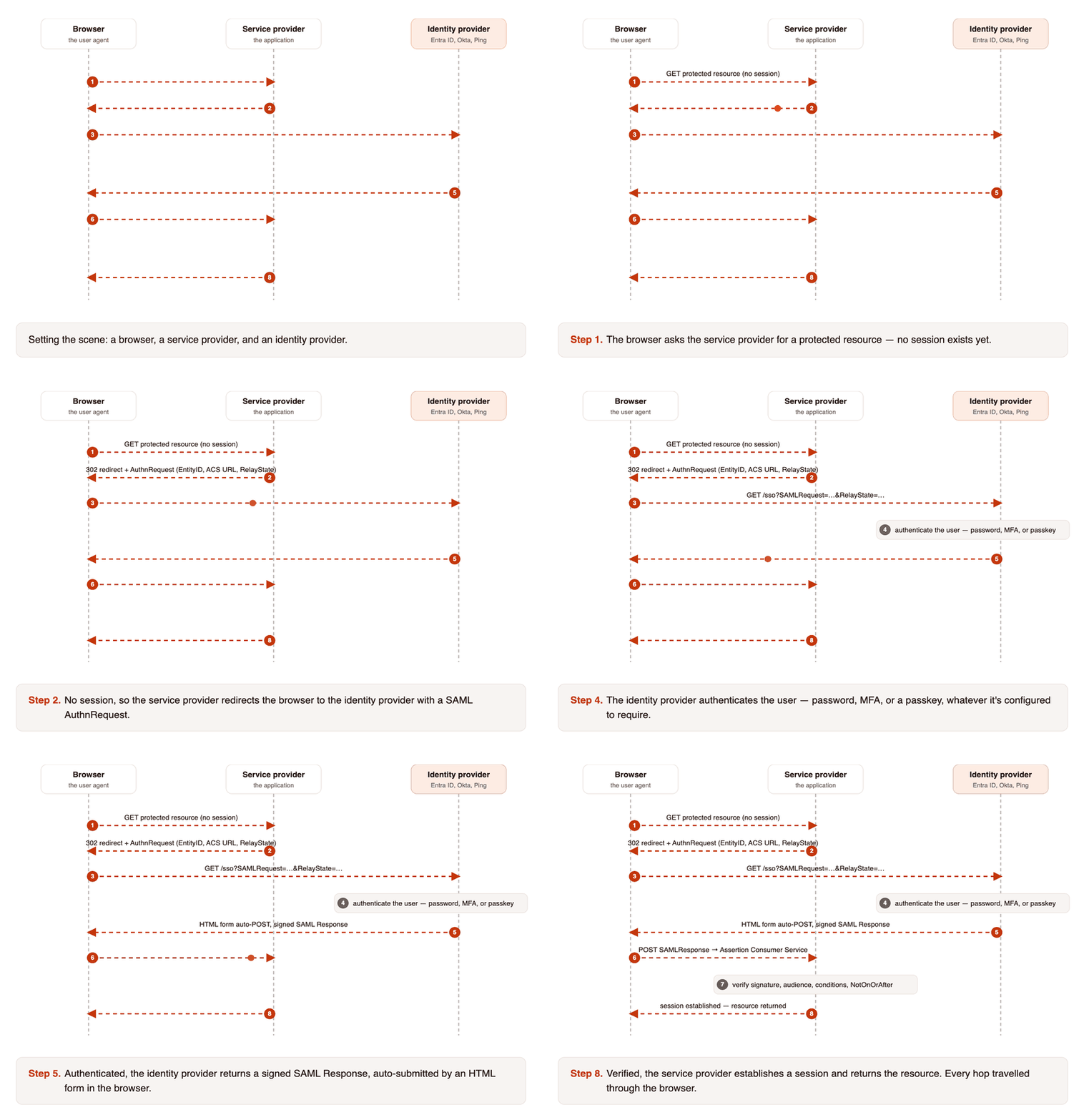
How SAML actually flows
SAML is a browser-mediated conversation between two parties that never speak directly. The service provider hands the user to the identity provider with a request, and gets back a signed statement carried by the browser itself.
How OAuth 2.0 actually flows
OAuth splits the conversation across two channels. The user-facing part travels through the browser, but the part that actually yields a credential is a direct server-to-server call the browser never sees.
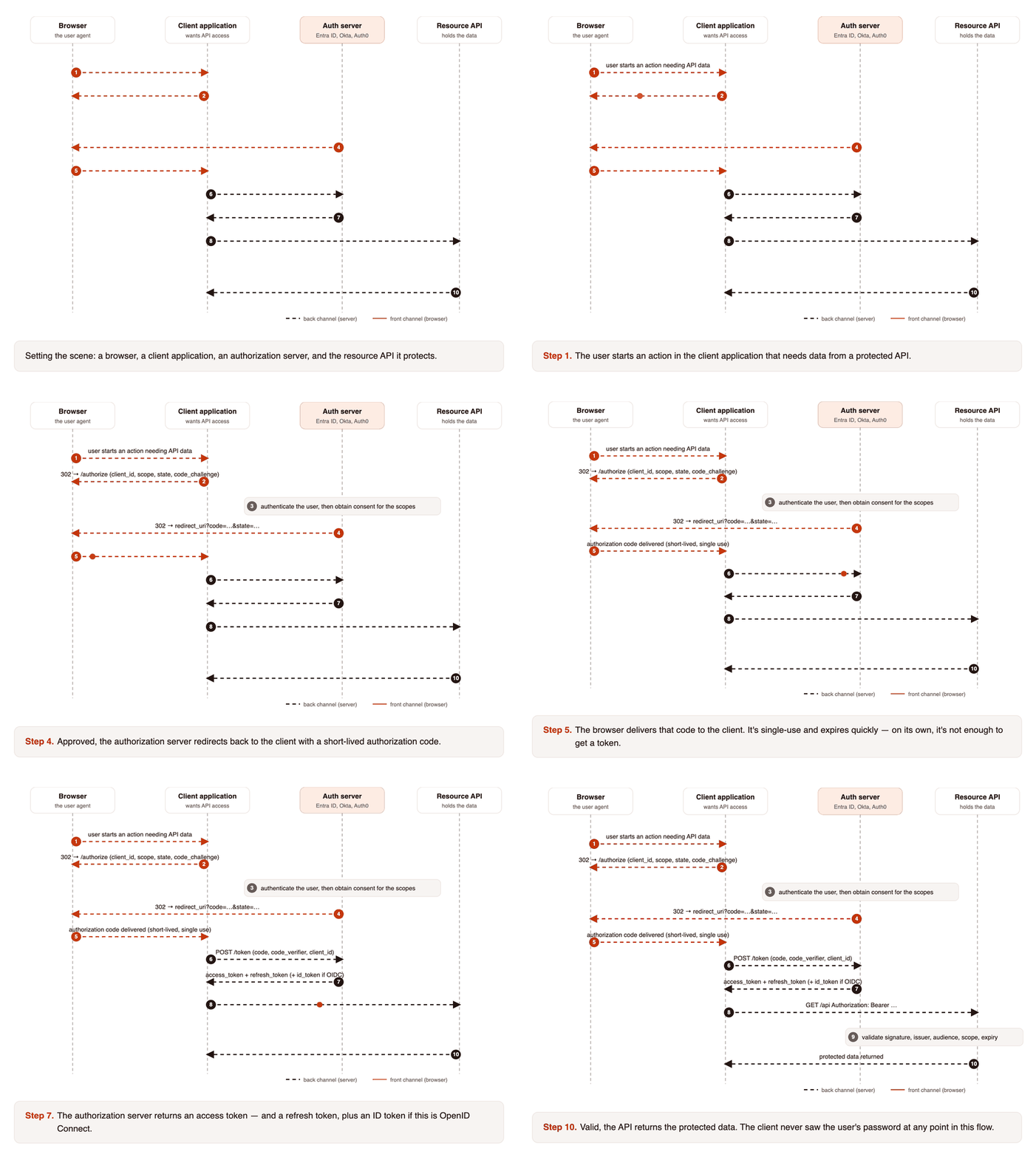
code_verifier, and why the client never sees the user's password at any point.The distinction that actually matters
Put the two sequences side by side and the difference is structural, not cosmetic. SAML ends with the application holding a statement; OAuth ends with it holding a credential.
A SAML assertion is a statement: this person authenticated, here is their identifier and attributes, signed by an authority you trust. It is consumed once, at login, to establish a session.
An OAuth access token is a capability: whoever holds this may do these specific things, to this resource, until it expires. It is presented repeatedly, on every API call, and it is deliberately narrow.
| SAML 2.0 | OAuth 2.0 | |
|---|---|---|
| Answers | Who is this user? | What may this application do on their behalf? |
| Designed for | Web SSO across enterprise applications | Delegated API access between applications |
| Returns | A signed assertion about an identity | A scoped, expiring access token |
| Format | XML, signed with XML-DSig | JSON; tokens commonly JSON Web Token (JWT) |
| Typical use | Staff logging in to Workday, Salesforce, ServiceNow | An application reading a user's calendar or files via API |
| Session model | Establishes an application session at login | Presented on every resource request |
| Mobile & native applications | Awkward (built around browser POST) | Designed for it |
Where OpenID Connect fits, and why it exists
The reason the two get conflated is that people kept using OAuth 2.0 to log users in. It appeared to work: you get a token back, so the user must have authenticated. That reasoning is wrong, and the failure mode is subtle.
The classic mistake: an access token proves that someone authorised the application. It does not prove who is currently using it, and it was never designed to be validated as evidence of identity. Applications that treated a token's presence as proof of login have been vulnerable to token substitution: accepting a token issued to a different application and logging the wrong user in.
OpenID Connect (OIDC) exists to close exactly this gap. It is a thin identity layer on top of OAuth 2.0 that adds an id_token: a signed JWT making explicit claims about the authenticated user, with an audience, an issuer, and an expiry that the application is expected to verify.
So the practical modern position is: OIDC for authentication, OAuth 2.0 for authorisation, SAML where the estate already speaks it. OIDC and SAML are the genuine alternatives to one another, not SAML and OAuth.
Authentication mechanisms, and what each one actually proves
Protocols move assertions around; they are not themselves proof of anything. What gives an assertion its weight is the mechanism the identity provider used before issuing it. These are the ones worth knowing.
| Mechanism | Factor | Where it fits | Where it falls down |
|---|---|---|---|
| Password | Knowledge | Baseline for most workforce and consumer access | Phishable, reused, and breached at scale, weak on its own |
| One-Time Password (OTP) / Time-based OTP (TOTP) | Possession | Second factor via authenticator app or hardware token | Phishable in real time; SMS delivery is weaker still |
| Push approval | Possession | Low-friction Multi-Factor Authentication (MFA) for a mobile workforce | MFA fatigue attacks: number matching is now the minimum |
| Fast Identity Online 2 (FIDO2) / WebAuthn / passkeys | Possession + biometric | The strongest widely available option; phishing-resistant by design | Device enrolment, recovery, and legacy application support |
| Certificate / mutual TLS (mTLS) | Possession | Machine, workload, and high-assurance user authentication | Certificate lifecycle: expiry is a common outage cause |
| Biometric | Inherence | Local unlock on a device, typically gating a stronger factor | Rarely a factor on its own to a remote service |
| Kerberos / integrated | Possession (ticket) | Domain-joined estates, seamless internal SSO | Assumes a network perimeter that mostly no longer exists |
| Risk-based / adaptive | Context | A layer over the others: device, location, behaviour | Not a factor in itself; only as good as its signal quality |
A protocol conversation is only ever as strong as the mechanism behind it. A SAML assertion issued after a password-only login carries exactly as much assurance as that password, which is to say, not much. This is why Zero Trust designs care about how the user authenticated, not merely that they did.
Choosing, in practice
- Workforce SSO into a Software as a Service (SaaS) application: SAML if the vendor supports it and your identity provider estate is already SAML-based; OIDC if you have a free choice.
- A mobile or single-page application: OIDC with PKCE. SAML was never designed for this and it shows.
- One service calling another's API on a user's behalf: OAuth 2.0, scoped as narrowly as the use case allows.
- Machine-to-machine, no user involved: OAuth 2.0 client credentials, or mTLS where assurance needs to be higher.
- Customer-facing authentication at scale: OIDC, with passkeys where you can and adaptive risk signals behind it.
The failure we see most often is not choosing wrongly between them: it is not realising they are different questions, and ending up with an application that has a token but no reliable idea who is holding it.